
Twitsave
Download video Twitter X free HD - 4K
If you’re looking for a quick and reliable way to save content from Twitter X, Twitsave is here to help. It’s a free Twitter Video Downloader that lets you download videos, images, and GIFs directly from Twitter without logging in or installing any apps.
Everything works right in your browser. Just copy a tweet link, paste it into Twitsave, and download your content in seconds.
What is Twitsave?
Twitsave is an online tool built specifically for downloading public content from Twitter X. It allows you to save videos, images, and GIFs in their original quality, without watermarks or restrictions.
Unlike many downloaders that feel cluttered or confusing, Twitsave keeps things simple. You don’t need an account, and you don’t need to install anything. If you can open Twitter and copy a link, you can use Twitsave.
Why Choose Twitsave Instead of Other Twitter Video Downloaders?
There are plenty of Twitter video downloaders online, but many of them come with problems—slow loading, broken buttons, forced sign-ups, or too many ads.
Twitsave focuses on what actually matters:
-
No watermark on downloaded files
-
No login or account required
-
Clean interface with minimal ads
-
Fast processing speed
-
Supports videos, images, and GIFs
-
Works smoothly with Twitter X
Instead of trying to do everything, Twitsave does one thing well: helping you download Twitter content quickly and without frustration.
Built Specifically for Twitter X – Fewer Errors, Better Stability
Twitter X changes its system often, and that’s why many download tools suddenly stop working. You might see missing download options, broken links, or videos without sound.
Twitsave is optimized specifically for Twitter X.
It’s regularly updated to recognize how Twitter handles videos, images, and GIFs. That means fewer errors and a more stable experience, even when Twitter rolls out changes.
For users, this simply means less waiting and fewer failed downloads.
What You Can Download with Twitsave
Twitter Video Downloader
With Twitsave, you can download Twitter videos in high quality, including HD and Full HD when available. Videos are saved with sound and play smoothly on all devices.
Twitter Image Downloader
Twitsave also supports downloading images from Twitter. If a tweet contains multiple images, you can save all of them in original resolution without compression.
Twitter GIF Downloader
Twitter GIFs are actually short videos. Twitsave converts them into MP4 format so they’re easier to save, share, and play on any device.
How to Download from Twitter Using Twitsave
Using Twitsave is straightforward and doesn’t require any technical skills:
1. Open Twitter X and find the tweet you want
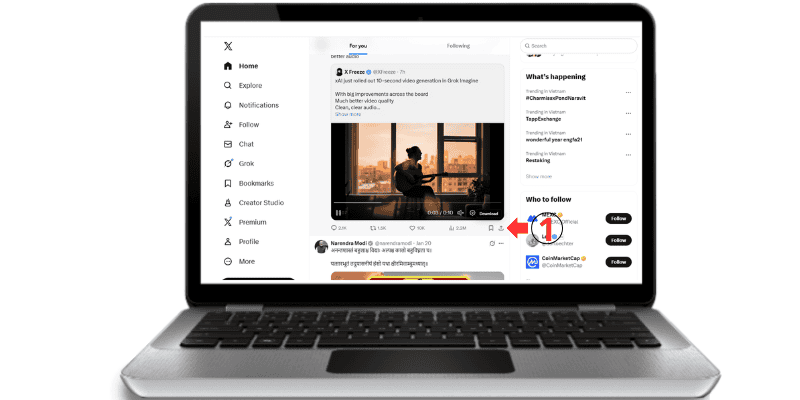
2. Copy the tweet’s link
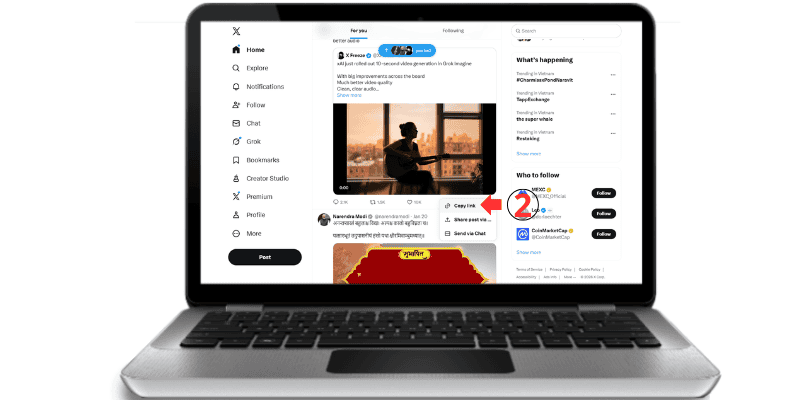
3. Paste the link into Twitsave
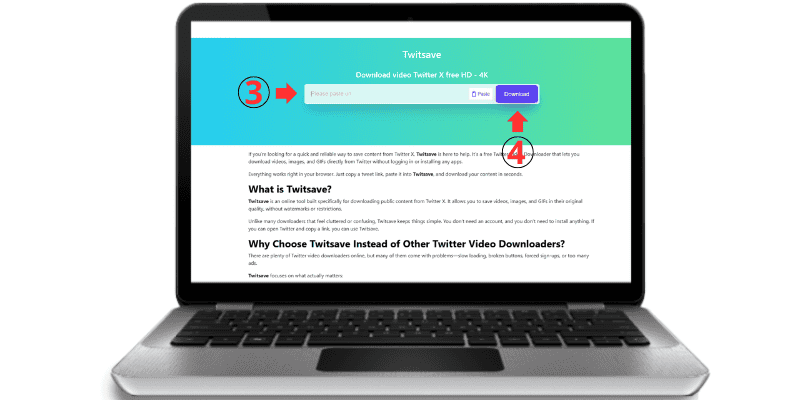
4. Choose your preferred format or quality
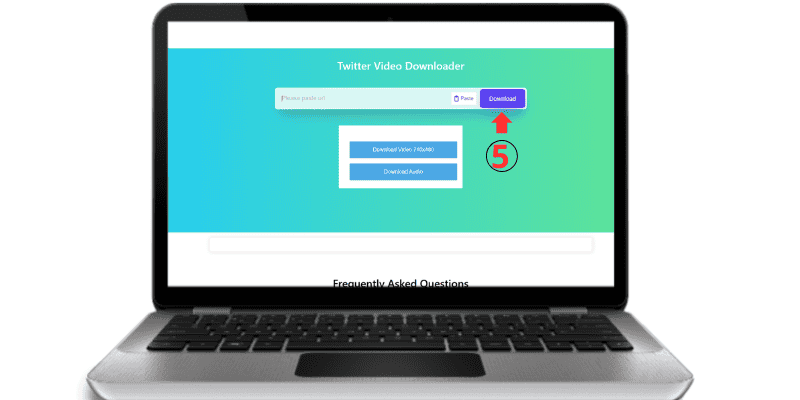
5. Download the file to your device
That’s it. No extra steps, no waiting around.
Why You Might Not Be Able to Download Twitter Videos or Images
If something doesn’t download, it’s usually not a bug. Here are the most common reasons:
-
The tweet is private or protected
Twitsave only works with public tweets. -
The tweet has been deleted
If the content no longer exists on Twitter, it can’t be downloaded. -
The link is incomplete or incorrect
Make sure you copied the full tweet URL. -
Temporary Twitter limitations
Sometimes Twitter restricts access to certain media files. -
Browser or network issues
Refreshing the page or switching networks often helps.
If the tweet is public and active, Twitsave usually works without issues.
Twitsave Focuses on Speed and Privacy, Not Data Collection
Many online tools track users or store downloaded files on their servers. Twitsave takes a different approach.
-
No file storage
-
No tracking scripts
-
No personal data collection
All downloads are processed temporarily and sent directly to your device. Once the download is complete, the process ends. This keeps Twitsave fast, lightweight, and respectful of your privacy.
Devices and Platforms Supported by Twitsave
You can use Twitsave on almost any device:
-
Android phones and tablets
-
iPhone and iPad
-
Windows PCs
-
macOS computers
No app installation is needed. Just open your browser and start downloading.
Is Twitsave Free and Safe?
Yes. Twitsave is completely free to use and safe. There are no hidden fees, and no software downloads involved.
Because Twitsave doesn’t store files or require personal information, it’s a safer alternative to many traditional download tools.
Copyright and Fair Use
Twitsave is intended for personal use only. If you plan to reuse or share downloaded content publicly or commercially, make sure you have permission from the original creator.
Twitsave – Download Twitter Content Without the Hassle
Twitsave keeps Twitter downloading simple. No watermark, no login, and no unnecessary steps. If you need a fast and reliable Twitter Video Downloader, Twitsave gets the job done.
Frequently Asked Questions
Twitsave is an online tool that lets you download videos, images, and GIFs from Twitter (X) quickly and without watermarks.
Yes. Twitsave is completely free and does not limit how many times you can download content.
No. Twitsave does not require registration, login, or personal information.
No. All videos downloaded with Twitsave are clean and watermark-free.
Yes. Twitsave works on both Android and iPhone through any modern web browser.
Yes. Twitsave fully supports links from Twitter (X), including videos, GIFs, and images.
Twitsave provides the best available quality from the original Twitter post, including HD when supported.
Yes. Twitsave is safe. We do not store user data, downloaded files, or submitted links.
No installation is required. Twitsave works directly in your browser on all devices.
Twitsave is a tool that helps users download publicly available content. Users are responsible for using downloaded media in accordance with Twitter’s terms of service and local copyright laws.