
SaveTwitter
Guardar Videos, Imágenes y GIF de Twitter X en Línea
SaveTwitter es una herramienta sencilla y confiable que te ayuda a descargar videos, imágenes y GIFs de Twitter (X) en solo unos segundos.
Sin marca de agua, sin inicio de sesión, sin pasos innecesarios. Solo pega el enlace y descarga.
Ya sea que quieras guardar un video viral de Twitter, una imagen de alta calidad o un GIF animado fluido, SaveTwitter (también conocido como SaveTWT) hace que el proceso sea rápido, limpio y sin complicaciones.
Herramienta para Descargar Videos de Twitter
Usar SaveTwitter es muy fácil.
Solo copia el enlace de Twitter (X), pégalo en el cuadro de descarga de arriba y haz clic en el botón de descarga.
SaveTwitter procesará automáticamente el enlace y preparará el contenido disponible para descargar, incluyendo videos, imágenes o GIFs, sin pedirte que te registres ni instales nada.
¿Qué Puedes Descargar con SaveTwitter?
SaveTwitter es compatible con todos los tipos de contenido multimedia más comunes que se comparten en Twitter (X).
Descargador de Videos de Twitter
Descarga videos de Twitter en su calidad original. Si hay varias resoluciones disponibles, puedes elegir la que mejor se adapte a tus necesidades.
Descargador de GIFs de Twitter
Los GIFs en Twitter en realidad son videos cortos. SaveTwitter los convierte en archivos descargables para que puedas guardarlos y reutilizarlos fácilmente.
Descargador de Imágenes de Twitter
Guarda imágenes individuales o publicaciones con imágenes de Twitter en resolución completa sin compresión.
Descargador de Medios de Twitter X
SaveTwitter está totalmente optimizado para el sistema más reciente de Twitter X, lo que garantiza descargas estables incluso cuando Twitter actualiza su plataforma.
Cómo Descargar Videos de Twitter con SaveTwitter
Descargar contenido de Twitter usando SaveTwitter solo requiere unos pocos pasos:
Paso 1: Abre Twitter (X) y copia el enlace de la publicación que contiene el video, la imagen o el GIF.


Paso 2: Pegue el enlace en el cuadro de entrada de SaveTwitter.
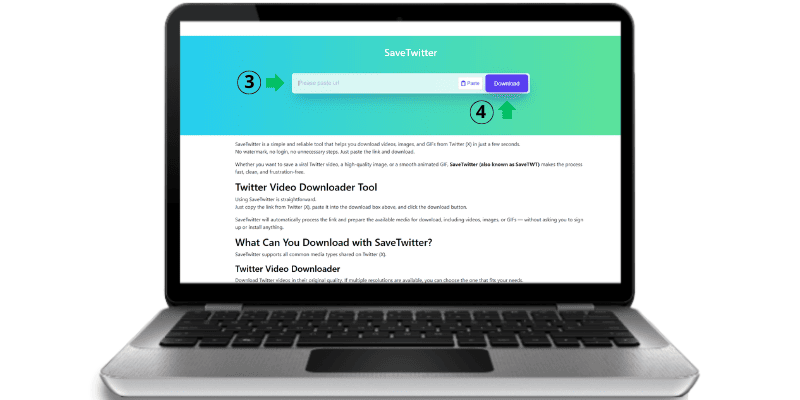
Paso 3: Haga clic en el botón de descarga y elija la calidad disponible.
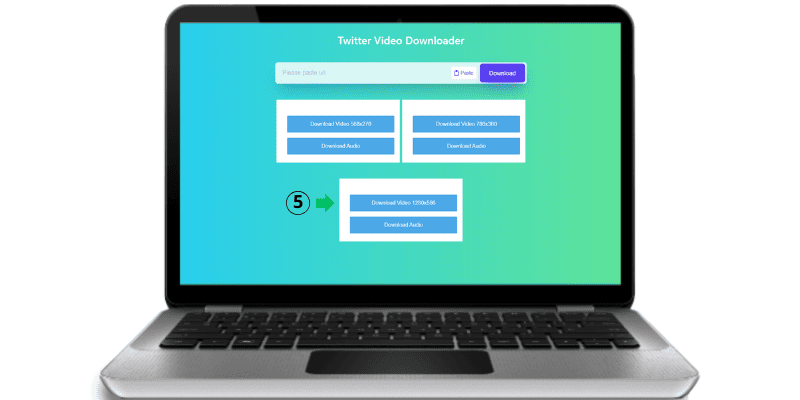
Eso es todo. Tu archivo se descargará directamente en tu dispositivo.
Por Qué SaveTwitter Es Diferente
Existen muchos descargadores de Twitter en línea, pero SaveTwitter se centra en lo que realmente les importa a los usuarios: velocidad, simplicidad y confiabilidad.
Detección Automática Inteligente
SaveTwitter detecta automáticamente si el enlace de Twitter contiene un video, un GIF o una imagen. No necesitas elegir el formato manualmente.
Sin Botones de Descarga Falsos
SaveTwitter no utiliza botones de descarga engañosos ni redirecciones forzadas. Lo que ves es exactamente lo que descargas.
Sin Marca de Agua, Calidad Original
Todo el contenido descargado mantiene su calidad original. No se añade ninguna marca de agua y los archivos no se vuelven a codificar.
Totalmente Compatible con Twitter X
SaveTwitter está diseñado para funcionar con las actualizaciones más recientes de Twitter X. Cuando otras herramientas fallan, SaveTwitter sigue funcionando sin problemas.
Descarga Directa, Sin Almacenamiento
SaveTwitter no almacena tus archivos. El contenido se procesa de forma temporal y se entrega directamente a tu navegador.
Rápido e Ilimitado
Sin límites de descarga, sin restricciones diarias y sin colas de espera. Puedes descargar tantos videos de Twitter como quieras.
Descarga Videos de Twitter en Cualquier Dispositivo
SaveTwitter funciona en todos los dispositivos y navegadores modernos.
SaveTwitter para PC y Portátiles
Usa SaveTwitter directamente desde tu navegador en Windows, macOS o Linux. No se requiere instalación de software.
SaveTwitter para Android
Descarga videos e imágenes de Twitter fácilmente usando Chrome o cualquier navegador móvil en Android.
SaveTwitter para iPhone (iOS)
SaveTwitter funciona en iPhone y iPad usando Safari u otros navegadores compatibles, sin necesidad de instalar una aplicación.
SaveTwitter para Tablets
Ya sea que uses tablets Android o iPads, SaveTwitter se adapta perfectamente a pantallas más grandes.
¿Es Seguro Usar SaveTwitter?
Sí. SaveTwitter está diseñado pensando en la privacidad y la seguridad.
-
No se requiere inicio de sesión ni registro
-
No se recopilan datos personales
-
No se almacenan archivos en servidores
-
Conexión HTTPS segura
Tú mantienes el control total de tus descargas en todo momento.
¿Es Legal Descargar Videos de Twitter?
SaveTwitter está destinado únicamente para uso personal y justo.
Los usuarios son responsables de respetar las leyes de derechos de autor y los derechos de los creadores de contenido. Si planeas reutilizar el contenido descargado con fines comerciales, siempre debes obtener el permiso del propietario original.
Por Qué SaveTwitter Funciona Cuando Otras Herramientas No
Twitter actualiza con frecuencia la forma en que entrega los archivos multimedia en su plataforma. Muchos descargadores dejan de funcionar cuando ocurren estos cambios.
SaveTwitter se optimiza continuamente para ser compatible con la estructura más reciente de Twitter X, garantizando descargas confiables sin depender de extensiones de navegador ni métodos obsoletos.
Creado para Creadores y Profesionales
SaveTwitter es especialmente útil para:
-
Creadores de contenido
-
Gestores de redes sociales
-
Editores de video
-
Especialistas en marketing digital
Si necesitas contenido limpio de Twitter para inspiración, edición o archivo, SaveTwitter te ahorra tiempo.
Idiomas Compatibles y Acceso Global
SaveTwitter está diseñado para usuarios de todo el mundo. La interfaz es sencilla, rápida y accesible desde cualquier país sin restricciones.
Herramientas Relacionadas
-
Descargador de Videos de Twitter
-
Descargador de GIFs de Twitter
-
Descargador de Imágenes de Twitter
Estas herramientas trabajan juntas para ofrecerte una experiencia completa de descarga de contenido multimedia de Twitter.
SaveTwitter – Simple, Rápido y Confiable
Si buscas una forma limpia y confiable de descargar videos, imágenes y GIFs de Twitter, SaveTwitter (SaveTWT) está hecho para ti.
Preguntas Frecuentes
SaveTwitter es una herramienta en línea que te permite descargar videos, imágenes y GIFs de Twitter (X) de forma gratuita.
Sí. SaveTwitter es completamente gratuito y no requiere registro.
No. Todas las descargas están libres de marca de agua.
No. Files are processed temporarily and delivered directly to the user.
La publicación puede ser privada, haber sido eliminada o estar restringida. SaveTwitter solo admite contenido público de Twitter.
Sí. SaveTwitter está totalmente optimizado para Twitter X.