
SnapTwitter
SnapTwitter, Twitter (X) üzerinden video, görsel ve GIF’leri sadece birkaç saniye içinde kaydetmenizi sağlayan basit bir Twitter video indiricisidir. Uygulama gerekmez, giriş yapmaya gerek yoktur ve herhangi bir sınır yoktur. Tweet bağlantısını yapıştırın, kaliteyi seçin ve anında indirin.
İster çevrimdışı izlemek için bir video kaydedin ister kişisel projeler için içerik toplayın, SnapTwitter her cihazda ve her tarayıcıda sorunsuz şekilde çalışır.
SnapTwitter Nedir?
SnapTwitter, artık X olarak bilinen Twitter’daki herkese açık içerikleri indirmek için tasarlanmış çevrimiçi bir araçtır. Doğrudan tarayıcı üzerinden çalışır; bu nedenle kurulum veya hesap oluşturma gerekmez.
SnapTwitter ile şunları yapabilirsiniz:
-
Twitter videolarını HD kalitede indirme
-
Twitter görsellerini yüksek kalitede kaydetme
-
Twitter GIF’lerini MP4 videolara dönüştürme
-
twitter.com ve x.com bağlantılarını kullanma
Amaç basittir: Twitter içeriklerini indirmeyi hızlı, kolay ve herkes için erişilebilir hale getirmek.
SnapTwitter ile Neler İndirilebilir?
SnapTwitter, Twitter (X) üzerinde paylaşılan çoğu herkese açık içeriği destekler, bunlar arasında:
-
Herkese açık tweet’lerden Twitter videoları
-
Orijinal çözünürlükte görseller
-
MP4 formatına dönüştürülmüş GIF’ler
-
Yalnızca tekil tweet’ler değil, thread içindeki videolar
Özel, korumalı veya kısıtlanmış tweet’ler desteklenmez.
SnapTwitter ile Twitter Videoları Nasıl İndirilir?
Twitter’dan bir video indirmek sadece birkaç saniye sürer:
1. Twitter’ı (X) açın ve tweet bağlantısını kopyalayın
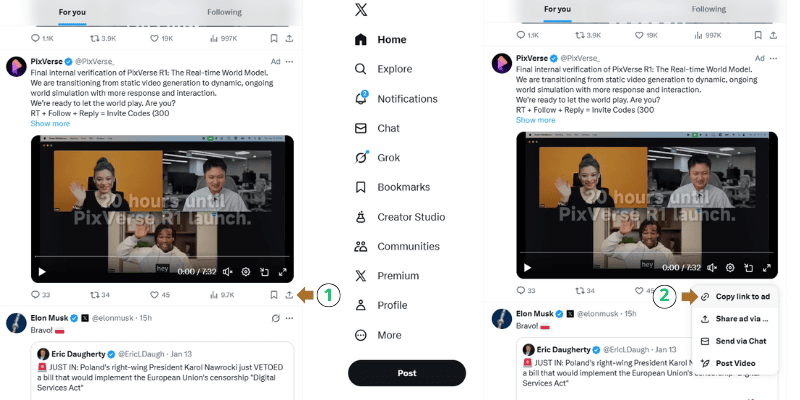
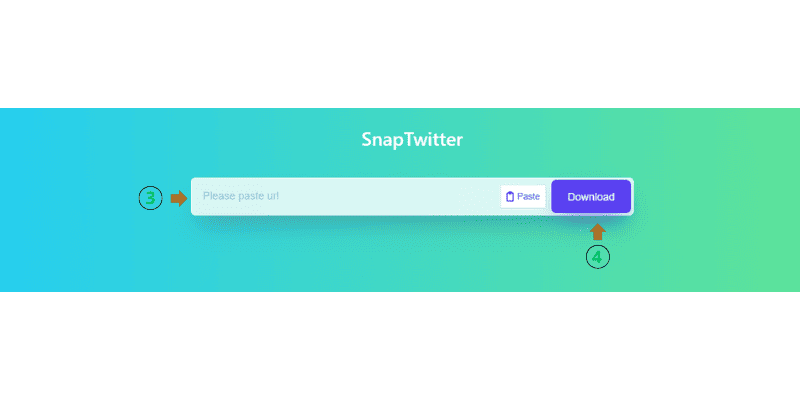
2. SnapTwitter'daki giriş kutusuna bağlantıyı yapıştırın.
3. Video kalitesini seçin ve indirmeye tıklayın.
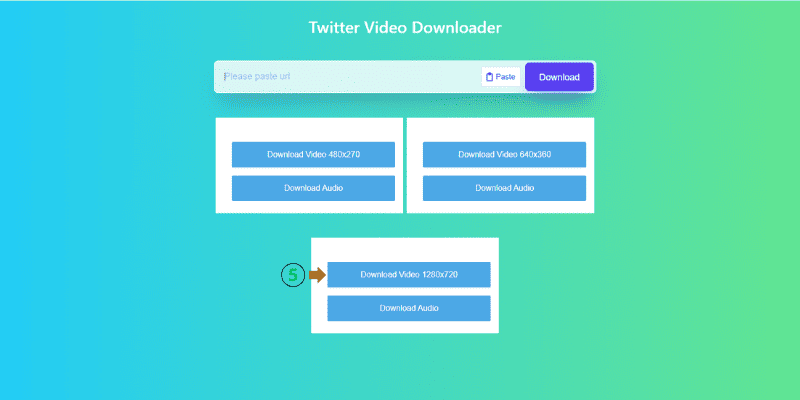
İşte bu kadar. Kayıt yok, ekstra adım yok.
İndirmeden Önce Twitter Videolarını Önizleyin
Çoğu Twitter video indirme aracı yalnızca bir indirme düğmesi sunar. SnapTwitter, videoyu indirmeden önce anlamanıza yardımcı olarak bir adım daha ileri gider.
SnapTwitter şunları gösterir:
-
Video süresi
-
Tahmini dosya boyutu
-
Mevcut kalite seçenekleri
-
Videoda ses olup olmadığı
Bu sayede doğru formatı seçmek ve ihtiyacınız olmayan dosyaları indirmekten kaçınmak daha kolay olur.
İndirilen Twitter Videolarıyla Neler Yapabilirsiniz?
Bir Twitter videosunu kaydetmek sadece daha sonra izlemek için değildir. Birçok kullanıcı içeriği pratik nedenlerle indirir:
Kısa Formatlı İçerikler İçin Twitter Videolarını Kullanın
Twitter’daki kısa videolar, basit bir düzenlemeden sonra TikTok, Reels veya Shorts için mükemmeldir.
Eğitici veya Bilgilendirici Videoları Kaydedin
Twitter, çevrimdışı izlemek için saklamaya değer eğitimler, tartışmalar ve bilgilerle doludur.
Sunumlar veya Tasarım İçin GIF İndirin
Dönüştürülen GIF’ler slaytlarda, yaratıcı projelerde veya kişisel videolarda kullanılabilir.
Videoları Kişisel Referans İçin Saklayın
SnapTwitter, gelecekte tekrar bakmak isteyebileceğiniz içerikleri arşivlemek için kullanışlıdır.
Twitter (X) İçin Özel Olarak Geliştirildi
Twitter’ın X’e geçişi, birçok indirme aracının düzgün çalışmamasına neden oldu. SnapTwitter bu değişiklikleri yönetmek için özel olarak geliştirilmiştir.
SnapTwitter otomatik olarak:
-
Hem twitter.com hem de x.com bağlantılarını destekler
-
Uzun videoları ve sabitlenmiş tweet’leri işler
-
Arayüz ve platform güncellemelerine uyum sağlar
Bu da SnapTwitter’ı, diğerleri çalışmazken bile güvenilir şekilde çalışan bir Twitter X video indirici yapar.
Desteklenen Video Kaliteleri
SnapTwitter, orijinal tweet’ten mevcut en iyi kaliteyi çıkarır:
-
Daha küçük dosya boyutları için standart kalite
-
Net oynatma için HD video
-
Orijinal yükleme destekliyorsa Full HD
Mevcut seçenekler, videonun Twitter’a nasıl yüklendiğine bağlıdır.
Neden SnapTwitter’ı Seçmelisiniz?
SnapTwitter; kullanılabilirlik, hız ve güvenilirliğe odaklanır:
-
Tamamen ücretsiz
-
İndirilen dosyalarda filigran yok
-
Açılır reklamlar veya zorunlu yönlendirmeler yok
-
Hızlı işlem ve temiz arayüz
-
Tüm modern tarayıcılarda çalışır
Her şey, deneyimi basit ve sorunsuz tutmak için tasarlanmıştır.
Gizlilik ve Güvenlik
SnapTwitter indirilen videoları saklamaz ve kullanıcı geçmişi tutmaz.
-
Hesap veya giriş gerekmez
-
İndirme kayıtları tutulmaz
-
Kişisel veri toplanmaz
SnapTwitter yalnızca kullanıcılar tarafından sağlanan bağlantıları işler. Medya indirirken ve kullanırken telif haklarına ve içerik sahipliğine saygı göstermek kullanıcıların sorumluluğundadır.
Her Cihazda Çalışır
SnapTwitter tüm platformlarda sorunsuz çalışır:
-
Android telefonlar ve tabletler
-
iPhone ve iPad (iOS)
-
Windows ve macOS bilgisayarlar
-
Chrome, Edge, Firefox ve Safari
İhtiyacınız olan tek şey bir tarayıcı ve internet bağlantısıdır.
SnapTwitter Kimler İçin Uygun?
SnapTwitter, geniş bir kullanıcı kitlesi için faydalıdır:
-
Referans materyali toplayan içerik üreticileri
-
İlham için medya kaydeden pazarlamacılar
-
Videoları arşivleyen öğrenciler ve araştırmacılar
-
Çevrimdışı erişim isteyen günlük kullanıcılar
Twitter içeriklerini indirmenin basit bir yoluna ihtiyacınız varsa, SnapTwitter sizin için geliştirildi.
Basit Twitter Video İndirici
SnapTwitter, Twitter (X) üzerinden video, görsel ve GIF indirmeyi hızlı ve zahmetsiz hale getirir. Kayıt yok, filigran yok ve tüm cihazlar için tam destek ile, güvenilir bir Twitter video indiriciye ihtiyaç duyan herkes için kolay bir seçimdir.
Sıkça Sorulan Sorular
SnapTwitter, herkese açık Twitter (X) gönderilerinden video, resim ve GIF indirmenizi sağlayan çevrim içi bir Twitter video indiricisidir. Doğrudan tarayıcı üzerinden çalışır ve hesap oluşturma veya uygulama yükleme gerektirmez.
Evet. SnapTwitter tamamen ücretsizdir. Gizli ücretler, abonelikler veya indirme sınırları yoktur.
Evet. SnapTwitter hem twitter.com hem de x.com bağlantılarını tam olarak destekler. Geçerli herhangi bir Twitter X gönderi URL’sini yapıştırarak mevcut medyayı indirebilirsiniz.
Hayır. SnapTwitter tamamen çevrim içi çalışır. Uygulama, tarayıcı eklentisi veya ek bir yazılım yüklemenize gerek yoktur.
Hayır. SnapTwitter yalnızca herkese açık Twitter gönderilerindeki video ve medya içeriklerini destekler. Özel, korumalı veya kısıtlı içerikler indirilemez.
Hayır. SnapTwitter ile indirilen tüm videolar filigransız olarak kaydedilir ve Twitter’da yüklendikleri hâliyle aynen korunur.
SnapTwitter, orijinal tweet’te bulunan tüm kalite seçeneklerini sunar; standart kalite, HD veya Full HD gibi. Mevcut çözünürlükler, Twitter’a yüklenen orijinal videoya bağlıdır.
Evet. SnapTwitter, Twitter GIF’lerini indirmenize olanak tanır. GIF’ler, daha iyi uyumluluk ve daha kolay kullanım için MP4 video formatına dönüştürülür.
Evet. SnapTwitter şu cihazlarda çalışır:
-
Android telefonlar ve tabletler
-
iPhone ve iPad (iOS)
-
Masaüstü ve dizüstü bilgisayarlar
Chrome, Edge, Firefox ve Safari dahil olmak üzere tüm modern tarayıcılarla uyumludur.
Evet. SnapTwitter oturum açma gerektirmez, indirilen dosyaları saklamaz ve indirme geçmişinizi takip etmez. Araç yalnızca sizin sağladığınız bağlantıyı işler.
Hayır. SnapTwitter indirilen hiçbir içeriği saklamaz veya arşivlemez. Videolar geçici olarak işlenir ve doğrudan kullanıcıya iletilir.
SnapTwitter kişisel ve eğitsel kullanım için tasarlanmıştır. Kullanıcılar, indirilen medyayı kullanırken telif hakkı yasalarına ve orijinal içerik sahibinin haklarına saygı göstermekten sorumludur.
Yaygın nedenler şunlardır:
-
Tweet özel veya kısıtlı olabilir
-
Tweet silinmiş olabilir
-
Bağlantı yanlış kopyalanmış olabilir
Tekrar denemeden önce tweet’in herkese açık ve erişilebilir olduğundan emin olun.
SnapTwitter sadelik ve güvenilirliğe odaklanır:
-
Filigran yok
-
Açılır reklam yok
-
Giriş gerekmez
-
Twitter X desteği
-
Tüm cihazlarda çalışır
Hızlı ve sorunsuz bir kullanım deneyimi sunmak için tasarlanmıştır.